"Discover a Simple Formula to Generate More Leads, Put Thousands in Your Pockets, and Build Your Online Business Lightning Fast..." Register Below To Receive E-Course
Fill Up The Form Beside To Start Your FREE E-Course.
I’ve finally finished all the 9 modules of Niche BluePrint. :)
I thought I would do my own notes and even considered to get a new note book for that. However, the truth is I didn’t write a single word inside my note book for the study of Niche BluePrint. Why? The reason is very simple, they have compiled all the important points into PDF files and I can just refer to the files in future.
Ok, just some quick share with you what I have learned. I feel that this is a must learn if you want to have your own home business selling products online. The most powerful is the niche finding and market research! They show the great way to find the profitable niche market and I must agree that this is the most important step that an online businessman must do. :)
They really have shown the whole process in a detailed procedure. You just won’t fail set up the e commerce site by follow their step by step guide. Like my earlier sharing about the modules, they also include the ways to generate traffic with free methods.
This is really a great course and it definitely helps in my online business. :)
Education is a powerful tool in any field of the career or business. :)
I’m going to learn something new – Niche BluePrint, which is a video series teaching you how you can setup your own niche ecommerce store and make a profit out of it. This is a topic which I’m not familiar or good with. I always happy to learn new thing and it’s time for me to sit down seriously and do my own notes again.
Frankly, I just finish downloading the videos and not start any yet, so this is definitely not a review for Niche BluePrint.
Just share with you what I’m going to learn. There are totally 9 Modules:
Module 1
A full overview of the Niche Blueprint Course, how it will work and where to get started.
Module 2
How to brainstorm, research and identify suitable niches that have potential for huge profits!
Module 3
Search for and identify products that’ll generate the highest level of of income and where to find suppliers who will stock and ship them.
Module 4
A detailed procedure on how to find a domain name that’ll boost your search engine rankings and deliver highly targeted buyers.
Module 5
How to set your E-commerce websites up for maximum conversions and sales.
Module 6
How to generate visitors, customers and cash with our step by step free traffic plan.
Module 7
This section will show you how to keep your E-Commerce websites operating both smoothly AND profitably for on going success.
Module 8
How to outsource the day-to-day operations so you can have autopilot income and make money while you relax!
Module 9
How to flip your website for 12 - 18 times monthly profit. This is one option for quick cash rather than operating your websites.
I think I need some time to finish the videos and will do my own notes.
*May show you my notes and hopefully there are great tips to share with you too ;)
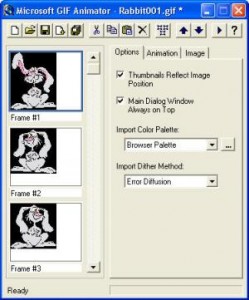
Some friends are asking me how I create my animated tag or button as I use at my Mompreneur site. Frankly, I just learnt how to do my animated tag two months ago from a friend and she told me to use a free software – MS GIF Animator.
This is a very simple and user friendly software that allow you to create your own animated button. You just need to download the sotware from MS GIF Animator and prepare yourself the photos you want to use. You need at least two photos to make your tag animated. Once you get your photos and software ready. You can now start to create your button.
Just import your photos and set the timing on how fast you want the tag to change from picture 1 to picture 2. Within few minutes you get your own animated tag ready. :)
Suggestion: Use photos with same file sizes so that to have better quality.
Tips: You can add words or website address inside the photos using Microsoft Office Picture Manager, Paint, Photoshop or other software you are familiar with before you import them into GIF Animator.
I believe everyone of us who has a blog or website would like to have many visitors or readers to our sites and build a high traffic website is almost everyone’s wish or dream. Yes, I am one of them and if you are telling me you are not one of us who wants to have lots of visitors to the blog, I will believe you.
I’ve talked to my sis once and I knew that some of them only want to share their blog to few of the close friends and they are not intend to “market” their site. In this case, I recommend you don’t read the following suggestions for building a high traffic website. In fact, I believe when the time they saw my title of “build a high traffic website”, they don’t even click on this post. :)
Recently, I have some friends ask me about how to attract more traffic to the website. Remember, build a site for your business is only the very first step. After you have a website for your online business, the process won’t just stop there but now is just the beginning. I still remember why I want to learn about internet marketing. When the time I joined some programs, I thought everything was just so simple like stated in their site that I don’t need any experiences or knowledge. But after I’ve explored more, I found that many things I needed to learn about and one of the thing I needed to know is how to build a high traffic website or blog.
Here are my 3 simple basic suggestions to attract more traffic to our sites.
1. Create valuable content
Strong content is universally valued. It’s always hard work to create it, but in the long run it generates lots of long term referral traffic. It’s not easy for me to understand the sentence of “create valuable content” when I was just get started. It seems so easy yet so difficult. I don’t know what content should I write about for this blog. I have then decided to share my learning experiences on internet marketing and hope others may gain some ideas from my blog.
Every time I write my content, I would assume that I’m writing for my friends who are interested to know what have I learned in internet marketing. Assuming they are reading my blog and they will get something from the reading. It’s very important when I have this in my mind. It’s kind of motivation and also my way to have better content articles.
I believe when you focus on providing real value content, your readers will notice.
2. Create timeless content
It is always better for us to write about something still providing real value and may still be read by people after many years. Unless your site is doing about news or current events, otherwise you should try to write content that is intended to be timeless.
I always try to have content that may be readable in future and at least when people read about my post one year later they still feel that it’s useful.
3. Know why you want a high traffic site
Only knowing the way to attract traffic to your site is not enough and it’s only a bridge to your main purpose. What is your main purpose of having the high traffic? You must know very clearly what kind of traffic you want and what the traffic can bring you.
If you have a business website that offer some products or services at your site, you should know that once you get the high traffic, the traffic must be able to bring you sales. Otherwise the high traffic would means nothing. Therefore, if you succeed in building high traffic website, you must respect this position and serve the best.
Of course there are many other factors to take into consideration for website traffic. However, I think the above are the most important and basic rules that we should take care of. If we could consistently apply the above to our sites or blogs, I believe it helps in long run.
I would like to share with you the two videos about website traffic that I find them very useful.
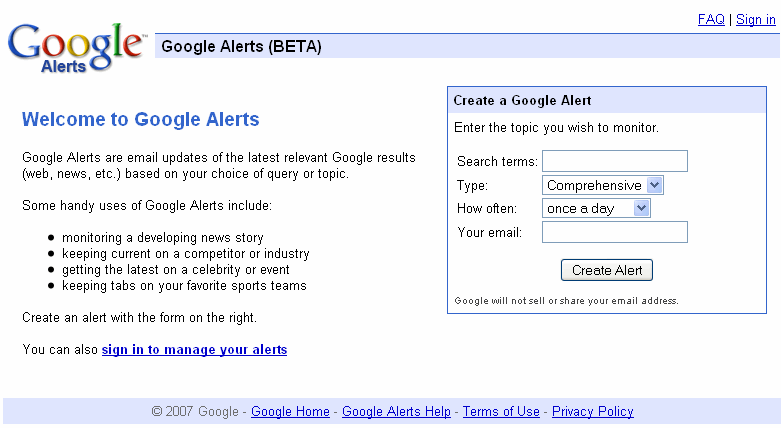
I have been using Google Alerts since few months ago and I keep receiving latest relevant google results for the topics I wish to monitor.
Google Alerts is very user friendly and it is kind of email updates based on your choice of query or topic. From the form, you just need to key in the search terms that you would like to receive email updates. For example, you want to know the latest relevant Google results for SEO. So, you just need to key in SEO or Search Engine Optimization in the Search terms . “SEO” and “Search Engine Optimization” would give you totally different email updates from Google.
There are few types for you to choose from. The choices included News, Blogs, Web, Comprehensive, Video and Groups. You may wish to choose the type of information you like to get based on the search term and your niche. Also, you could receive the mails on daily or weekly basis.
I’ve read an article by Saikat Basu about “10 Uses of Google Alerts For A Freelancer”. He has very good points about why we should use Google Alerts and also some tips to manage Google Alerts.
Make Google Alerts your virtual research assistant
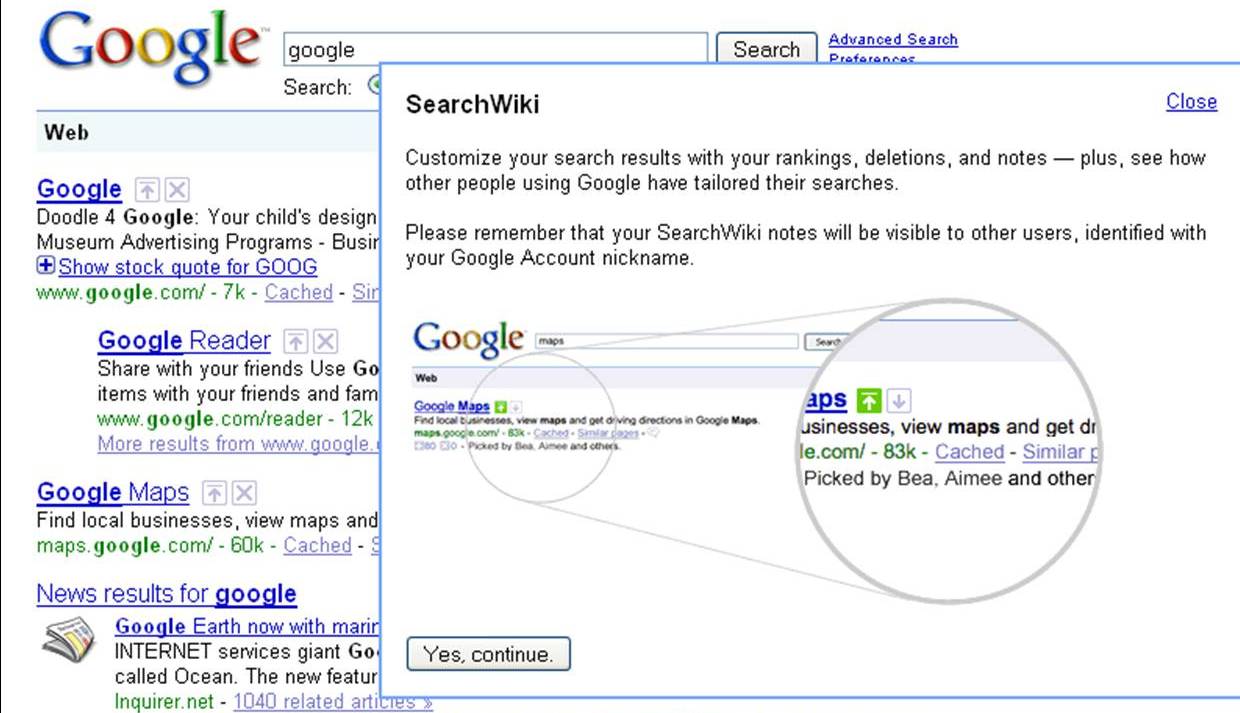
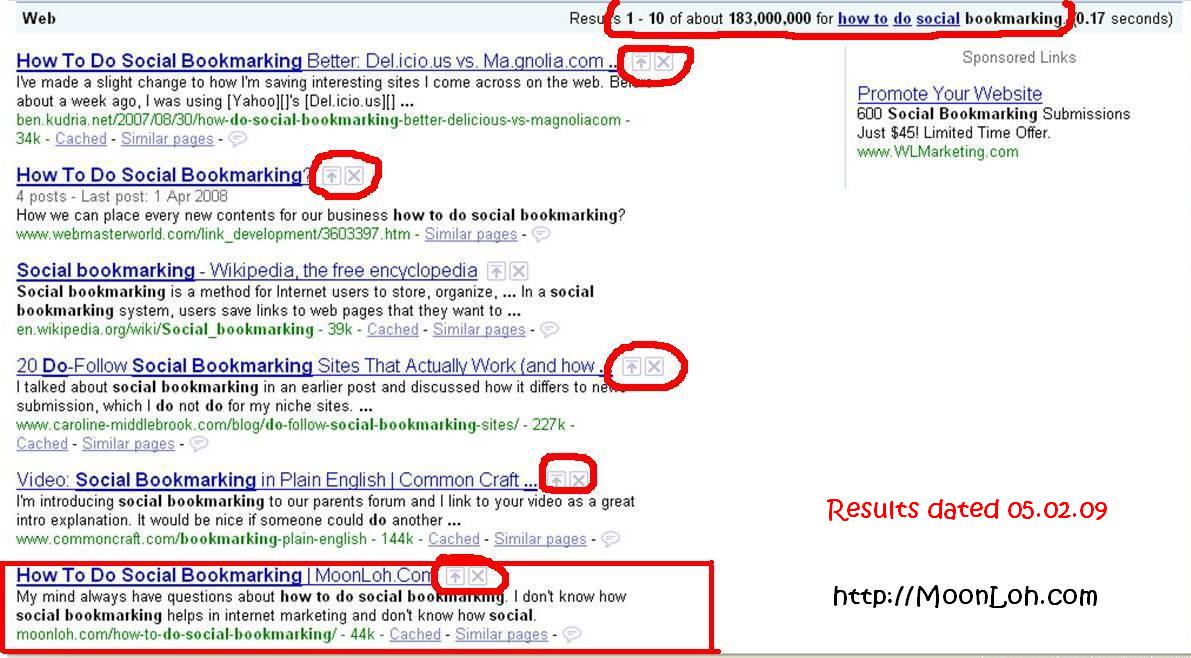
Today I discover something different when I’m using Google Search. Besides the search results, there are a “Up arrow” and a “Delete” boxes. Out of my curious, I click on the “Up arrow” and there is a pop-up as below:
So, what does this mean? I could customize my search results with the rankings I want? I could put my own website to the rank of #1? If it can simply change the ranking, how about the effort of doing all the SEO and LSI? Many questions just appear in my mind. I then found a video that explain more about Google SearchWiki.
And also a post on Google SearchWiki Kill SEO Ranking? – It says that the changing only affect the particular computer and only if he log on to his google account.
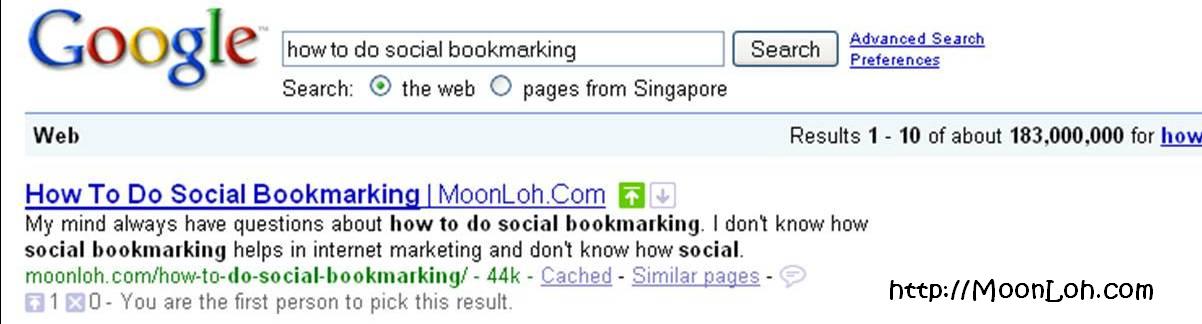
I do a test by myself for the keyword “how to do social bookmarking”. My website rank #6 originally but after my “adjustment”, it ranks #1.
Before Using SearchWiki
After Using SearchWiki – This result only effective when I log on to my google account.
So, what do you think about Google SearchWiki? Any advantages and disadvantages of boosting the websites’ ranking and it can only be viewed by ourselves?
I have encountered problems with my website layout at Internet Explorer (IE) for many times. I normally use Mozilla Firefox for my daily online but I would use IE for my websites testing.
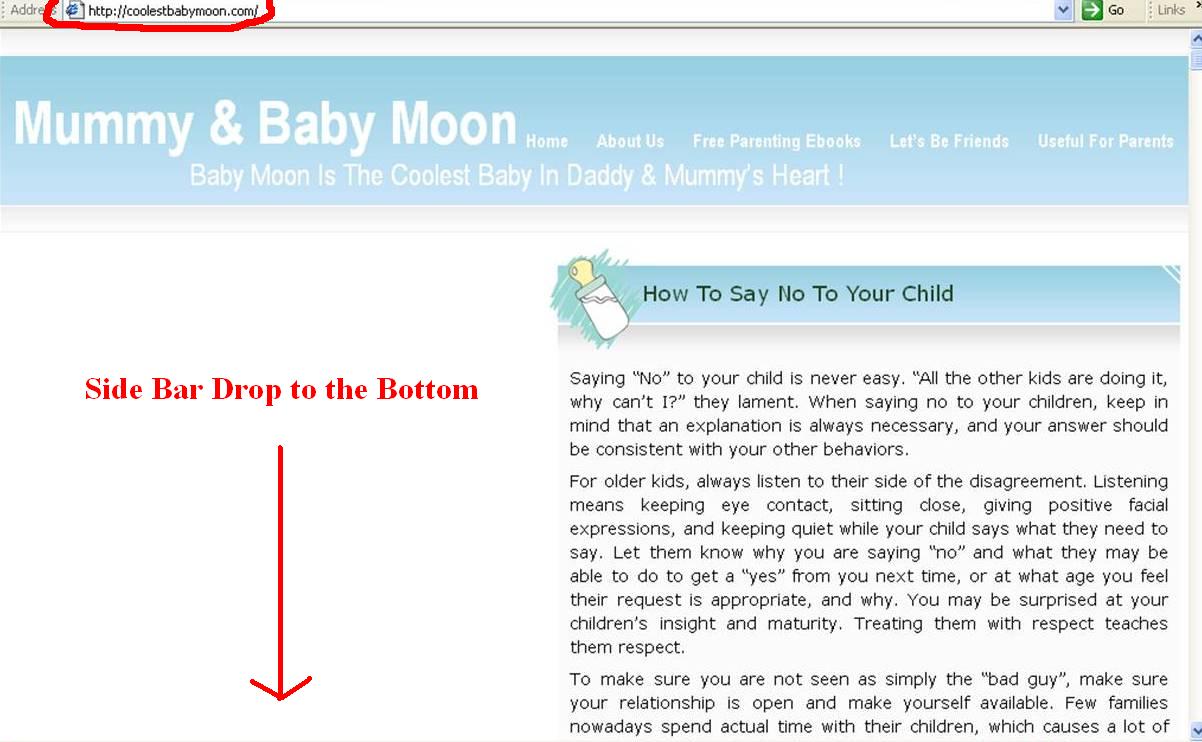
This morning my friend, Paul told me that one of my website’s sidebar dropped to the bottom of the posts. I quickly open my IE and found that my site looked like this:
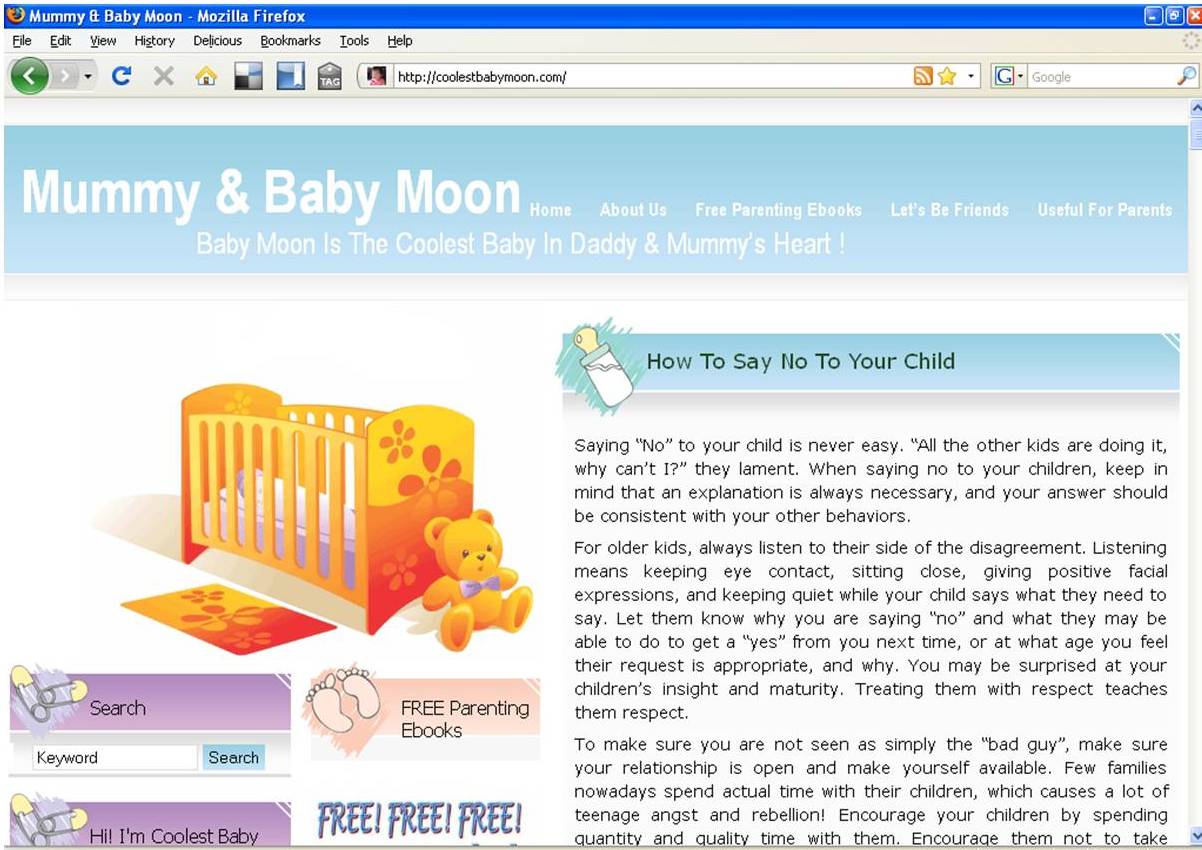
But when I opened with my Mozilla Firefox, it looked just great!
I suddenly remember I just added in a new widget last week and this might be the cause of the layout problem. Since I have experiences on how to deal with this problem, it took me a few minutes for the small adjustment at the sidebar width.
And it looks normal and working good at IE now.
I suggest you to check your websites periodically to make sure the layout of your themes are working in order. Any new added in widget may cause the change of the layout at IE.
And if you encountered the layout problem, try the following ways:
Check the size of your widget, does a particular widget too big in the width?
If all your widgets’ width are ok, now check the sidebar width for your theme and try to reduce the size.
You might need to try for few times and normally it works well after the adjustment at sidebar width.
If it’s still not working, then this is time for you to check your header’s width if you are using custom header.
1) Be Prepared.
2) Avoid Javascript.
3) Content is King.
4) Build Backlinks.
5) Don’t obsess over PageRank.
6) Focus on Titles.
7) Keep Content Fresh!
8 ) The Key to Good Links.
9) Phrasing it Correctly.
10) Don’t Design in a Vaccum.
11) Keep Adding Keywords.
12) Don’t Split Your Link Juice.
13) Ditch the Long Names.
14) Forget About Frames!
15) What Really Counts.
16) Get Indexed Quickly.
17) Start a Blog.
18) Quality Counts.
19) Don’t Abuse The System.
20) Guilt by Association.
10 Simple Steps To Achieve High Search Engine Rankings
-Know your geographic market and ensure your domain has the correct TLD.
-Include keyword in Domain name (using hyphens if necessary).
-Create as much content about your products or subject as you can.
-AFTER you have your site content start keyword researching
-Decide on 4 or 5 primary keywords to use as main sub-sections
-Sit down and sketch out your navigation system
-Re-write content using knowledge previously gained about keywords and phrases
-Structure each individual page
-Proof read your completed page and get a 2nd opinion
-Construct your site.
Remember
1. Be Patient, Things will take time
2 Don’t Overdo anything – it Can harm you
3 Automated Link Exchange Programs are Dead
4 Never spam as It don’t work
5 Don’t do BlackHat unless you know what you are Doing
6 Don’t buy too many softwares/ebooks
7 Never participate in any kind of traffic exchange programs
8 .edu Links from blogs are Useless
9 If something looks unreal, than most likely, it is
There are some important information that we need to understand when get involved in Social Media Marketing in order for our business to success. Social Media Marketing can be a failure if you don’t know the “rules” and simply go ahead and overdo it.
Social media is closely related to Web 2.0 and therefore we must take note of the following when implement the social media marketing.
1. We must be a real user- Here we are not referring to get a robot to work for us. What I mean is to show your real interests and vote for your favourite or what you found interesting. If you are getting your staff to involve at social bookmarking sites like StumbleUpon, Digg or Delicious, it’s important for them to focus on the topics or articles that they like so that they might not lose interest in social media.
2. Get involved in social media sites and understand them – We need to get involve ourselves in different top social media sites and to understand how the sites are working. It’s ideally to use it on a regular basis especially with the social bookmarking sites.
3. Focus on your niche – We might find some top sites like StumbleUpon or Digg drive many visitors to certain people. However, it’s always good for us to identify our niche and focus on sites that can drive correct traffic. Although focus on a niche might send fewer visitors, but those visitors will likely find the content more relevant and help to increase your conversion rate.
4. No control on them – We totally have no control on the results and also the results can’t be guaranteed. It’s just like we don’t have any control over the search engine rankings.
5. Digg is not the only social media site – Many people know the powerful of Digg and the Digg effect. However, Digg is not the only social media site and failure in Digg doesn’t mean that your website or campaign failure. We can always drive massive traffic from other social media sites.
6. Good contents not always mean good traffic – The main key is what is the social media users want at the particular site. Althought you have generate very good content but it doesn’t guarantee you the traffic and there might be very few users really picked it up.
7. No heavy pitching or selling – Many content sharing sites don’t allow advertising content and we should go light on selling or promotional messaging. Instead of writing about how great our products are, we should go for the benefits or features of the products.
8. Always offer value especially to your niche – Value means different things to different people. Same contents but always mean different value to users and we should always create content that offer value to our niche.
9. Participate personally in communities – It’s always essential for us to participate personally and engage with communities on social networks. Leaving comments on blogs and forums or joining groups on Facebook are good ways to build online presence and get people to notice about you.
10. Should also use other strategies – Don’t only rely on social media marketing. Other strategies like SEO, LSI or PPC Campaigns are also important to bring in the great results.
Search engine ranking factors are the factors that that can influence a web document’s rank at the major search engines for a particular term or phrase.
Search Engine Factors
A) Keyword Use Factors
B) Page Attributes
c) Site/Domain Attributes
D) Inbound Link Attributes
E) Negative Crawling/Ranking Attributes A) Keyword Use Factors
- Keyword use in Title Tag
- Keyword use in Body Text
- Relationship of Body Text context to keywords (Topic Analysis)
- Keyword use in H1 Tag
- Keyword use in Domain Name
- Keyword use in Page URL
- Keyword use in H2, H3, H(x) Tags
- Keyword use in Alt Tags and Image Titles
- Keyword use in Bold/Strong Tags
- Keyword use in Meta Description Tag
- Keyword use in Meta Keywords Tag
B) Page Attributes
- Link popularity within the site’s internal link structure
- Quality / relevance of links to external sites / page
- Age of documents
- Amount of indexable text content
- Quality of the document content (as measured algorithmically)
- Organisation / hierarchy of document flow (i.e. broad > narrow)
- Frequency of updates to page
- Number of trailing slashes (/) in URL
- Accuracy of spelling and grammer
- HTML validation of document
C) Site/Domain Attributes
- Global link popularity of site
- Age of site
- Topical relevance of inbound links to site
- Link popularity of site in topical community
- Rate of new inbound links to site
- Relevance of site’s primary subject matter to query
- Historical performance of site as measured by time spent on page, clickthroughs from SERPs, direct visits, bookmarks, etc.
- Manual authority/weight given to site by Google
- TLD extension of site (edu, gov, us, ca, etc)
- Rate of new pages added to site
- Number of queries for site/domain over time
- Verification of site with Google webmaster centre
D) Inbound Link Attribute
- Anchor text of inbound link
- Global link popularity of linking site
- Topical relationship of linking page
- Link popularity of site in topical community
- Age of link
- Topical relationship of linking site
- Text surrounding the link
- Internal link popularity of linking page within host site/domain
- Temporal link attributes (when in time the links was created/updated)
- Domain extension of linking site (edu, gov, us, ca, etc)
- Page rank (as measured by the Google Toolbar) of linking page
E) Negative Crawling/Ranking Attributes
- Server is often inaccessible to bots
- Content very similar or duplicate of existing content in the index
- External links to low quality/spam sites
- Duplicate title/meta tags on may pages
- Overuse of targeted keywords (stuffing/spamming)
- Participate in link schemes or actively selling links
- Very slow server response times
- Inbound links from spam sites
- Low levels of visitors to the site (measured via toolbar, clicks in SERPs, etc)
I have been looking around for online opportunity and I am honor to have met Moon. When I first saw her Mompreneur Asia Website, I was deeply inspired and very impressed. Being a full time mother and with her will to believe that making money online is possible. Being through the hard work, she has proven to many people that anyone can make money online. Her willingness on helping people like me has given me a guideline in life that decision is upon individual. So if you are looking for opportunity like me, Moon Loh should be the one you are long looking for.
Charmaine Ong
It has been my pleasure to work with Moon Loh since last year. She has consistency and integrity in her work. She shares her knowledge in internet and network marketing generously. I would definitely recommend Moon Loh without hesitation
Viviana Andrew
I have known Moon Loh since Year 2010. When I first saw her Mompreneur Asia website, I was very impressed. She is really someone I admire very much. From an ordinary housewife to becoming one of the top internet marketers in Asia, she had proven that anyone can make money online. She is also very down to earth and willing to share her knowledge and skills with others. I am glad to have the privilege to work with Moon.
Ket Sang Tai
Moon shares freely her knowledge in internet marketing to her team and patiently teach them till they understand. Her leadership is worth commending on. If you want to find someone whom you can learn and work with to succeed in Internet Network Marketing, Moon is the person you can look for.


 If There's a will, There's a way!
  is my motto.