If There's a will, There's a way!    is my motto.
    "Discover a Simple Formula to Generate More Leads, Put Thousands in Your Pockets, and Build Your Online Business Lightning Fast..."
    Register Below To Receive E-Course

Fill Up The Form Beside To Start Your FREE E-Course.

Posts Tagged ‘ Tools ’

How To Create Own Animated Tag

tag
1 Comment

Some friends are asking me how I create my animated tag or button as I use at my Mompreneur site. Frankly, I just learnt how to do my animated tag two months ago from a friend and she told me to use a free software – MS GIF Animator.
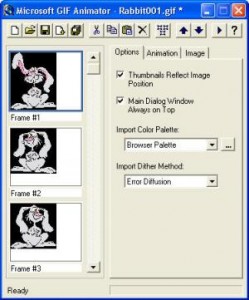
This is a very simple and user friendly software that allow you to create your own animated button. You just need to download the sotware from MS GIF Animator and prepare yourself the photos you want to use. You need at least two photos to make your tag animated. Once you get your photos and software ready. You can now start to create your button.

Just import your photos and set the timing on how fast you want the tag to change from picture 1 to picture 2. Within few minutes you get your own animated tag ready. :)

Suggestion: Use photos with same file sizes so that to have better quality.

Tips: You can add words or website address inside the photos using Microsoft Office Picture Manager, Paint, Photoshop or other software you are familiar with before you import them into GIF Animator.

Continue Reading

Use Google Alerts To Get Latest Relevant Google Results

Google-Alerts
2 Comments

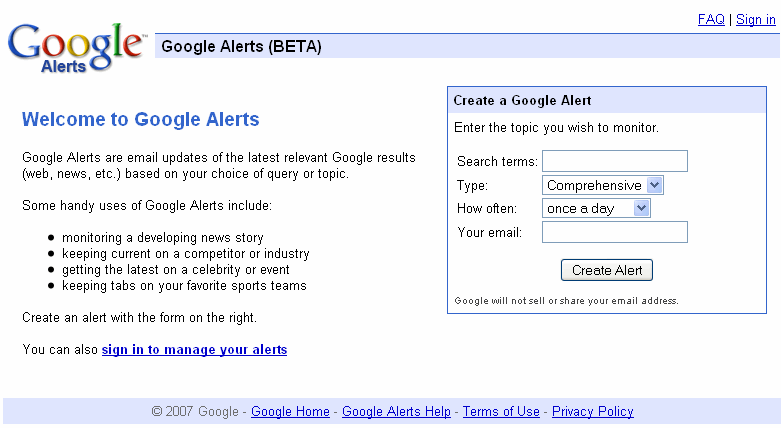
I have been using Google Alerts since few months ago and I keep receiving latest relevant google results for the topics I wish to monitor.

Google Alerts is very user friendly and it is kind of email updates based on your choice of query or topic. From the form, you just need to key in the search terms that you would like to receive email updates. For example, you want to know the latest relevant Google results for SEO. So, you just need to key in SEO or Search Engine Optimization in the Search terms . “SEO” and “Search Engine Optimization” would give you totally different email updates from Google.

There are few types for you to choose from. The choices included News, Blogs, Web, Comprehensive, Video and Groups. You may wish to choose the type of information you like to get based on the search term and your niche. Also, you could receive the mails on daily or weekly basis.

I’ve read an article by Saikat Basu about “10 Uses of Google Alerts For A Freelancer”. He has very good points about why we should use Google Alerts and also some tips to manage Google Alerts.

Make Google Alerts your virtual research assistant

Continue Reading

XsitePro – My Website Builder

xsitepro
2 Comments

XsitePro is a very great tool helping me to build my website. I’m not good in the Dreamweaver as it requires more technical knowledge that I lack of. I get this XsitePro to help me easily build my website within a very short time and it’s really my secret weapon for create a website.

Xsitepro is perfect for beginners, business owners, affiliate marketers and even website designers. The WYSIWYG Panel Designers makes a more accurate editing process and it doesn’t require me to have any css or html knowledge.

You can check out the XsitePro Features here.

It is very user friendly to let me create professional quality sales letter page, massive content rich niche site, site for selling affiliate products and also it gives you the power to create great looking corporate site.

Read What Other People Are Saying About XsitePro

You can get a FREE XsitePro Brouchure here.

I can create unlimited websites with this single software and just another powerful point of Xsitepro is it incorporates the power of SEO which helps to optimise the website. If you are really serious about your internet business, I highly recommend you to get this great tool to help you boost your business.

Continue Reading