


 If There's a will, There's a way!
  is my motto.



After I have shared my collection of 126 MRR Ebooks, I get thank you emails from friends and some of them tell me that they would like to share with their readers, but they are using blogger blog and don’t know how to upload the pdf file to blogspot. I didn’t use blogspot and I didn’t have any idea why blogspot doesn’t have the upload file function. With the curiosity and also hope to find a solution for my friends, I “borrow” a blogspot account from friend and start to try the ways to upload a PDF file. Finally~~ I get the solutions. :)
2 Ways:
1) Use Google Group
2) Upload to Ziddu.com
1) Use Google Group
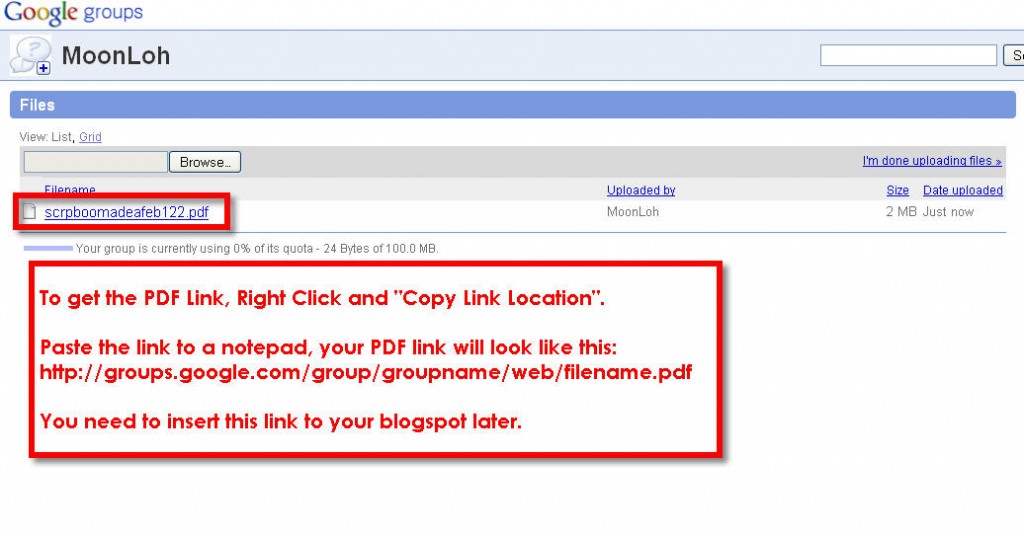
It is not difficult, I capture some screenshots so that you can follow well. All you need to do is to create a “Google Group” account – http://groups.google.com





2) Upload to Ziddu.com
Ziddu is easy to use. All you need to do is to register an account with them and upload the PDF file using the function provided. Every time people download from your link, you get paid. Click here to go Ziddu.com
See, it’s pretty easy right?! :)
Get my 126 Master Resell Rights (MRR) Ebooks and share with your readers.


Hi Moon,
Yup… blogger does not have the function to upload pdf to blogspot.
Creating a Google Group is a great idea.
Alternatively, one can register for a FREE account at ziddu.com and upload the file ( pdf,pictures,etc) and post the url (u will get it upon uploading the files) on your blog/site.
The benefit : 1. everytime people download the files that you shared, you will get $$.
2. You can create a viral effect :-)
The disadvantages : the files that can be uploaded is small.
Regards,
Lena Khalid
Get Paid to build your list –> http://skadoogle.com/go!5p
Good idea Lena. Can share the files and at the same time earn money. Hehe.. :)
hey thank you so much for the information
please feel free to download my ebook :P
do v earn money whn people click on the links by google groups……the links tht google grp gives us, does tht also helps us earn money whn v give tht link on our blog????????????? reply ASAP
Hi Mudit,
The Google Group is not affiliate program and they don’t offer commission. :)
i ve open an accoun in Ziddu.com. but i dont know how to appear it on the blog. can u pls help
cant i do it using google docs? and what about direct links to the document? do some one need to log in using google account for the doc to view…?
@soft-man: Your readers no need to login google account to view the doc.
Hi! as trying to follow step one with google groups and it seems they are not offering the file function anymore… since 13th January 2011
MoonLoh, I’ve just created my Google Group to be able to upload pdf files, however I can’t find where to upload files. I don’t see that screen shot anywhere. Are we still allowed to upload pdf files on Google Groups? Thanks
Hi Renata, Google has changed a new group format, you need to take a tour to go explore more about the change. The layout may be different but I think still be able to upload the file.
I creat a google groups account but i did not see a file butten on my right side.
i upload a file from documents but on pdf file link did not show copy on right click .
Plz help me.
Hello, I’ve created my google group but I can’t find the ‘File’ option. Can you help me to find it? ‘Cause I really want to post my ebook. Thanks!
Like Nik above, I can’t find the ‘File’ option. I’d like to upload some files on my blog as well. Any advice would be appreciated.